There is a moment at almost every wedding reception where the photo booth stops working. Not technically. Socially. It is 9:40pm, the line has cleared, the attendant is scrolling on a stool, and the $1,200 rental is now an expensive piece of furniture between the bar and the dance floor. Meanwhile there are 140 people in the room holding 140 cameras, and not one of those photos is going to reach you.
That gap is why "photo booth alternatives" has quietly become one of the most-asked questions in event planning. It is rarely about hating photo booths. It is about the math. A booth captures the guests who queue for it, during the hours you paid for, in one corner of one room. Your wedding happens everywhere else.
The good news is that the alternatives have gotten genuinely good. Some are cheaper. Some are better. A few are neither, and we will say so. Below are 15 options with what each actually costs in 2026, who it suits, and the catch nobody in a rental brochure mentions.
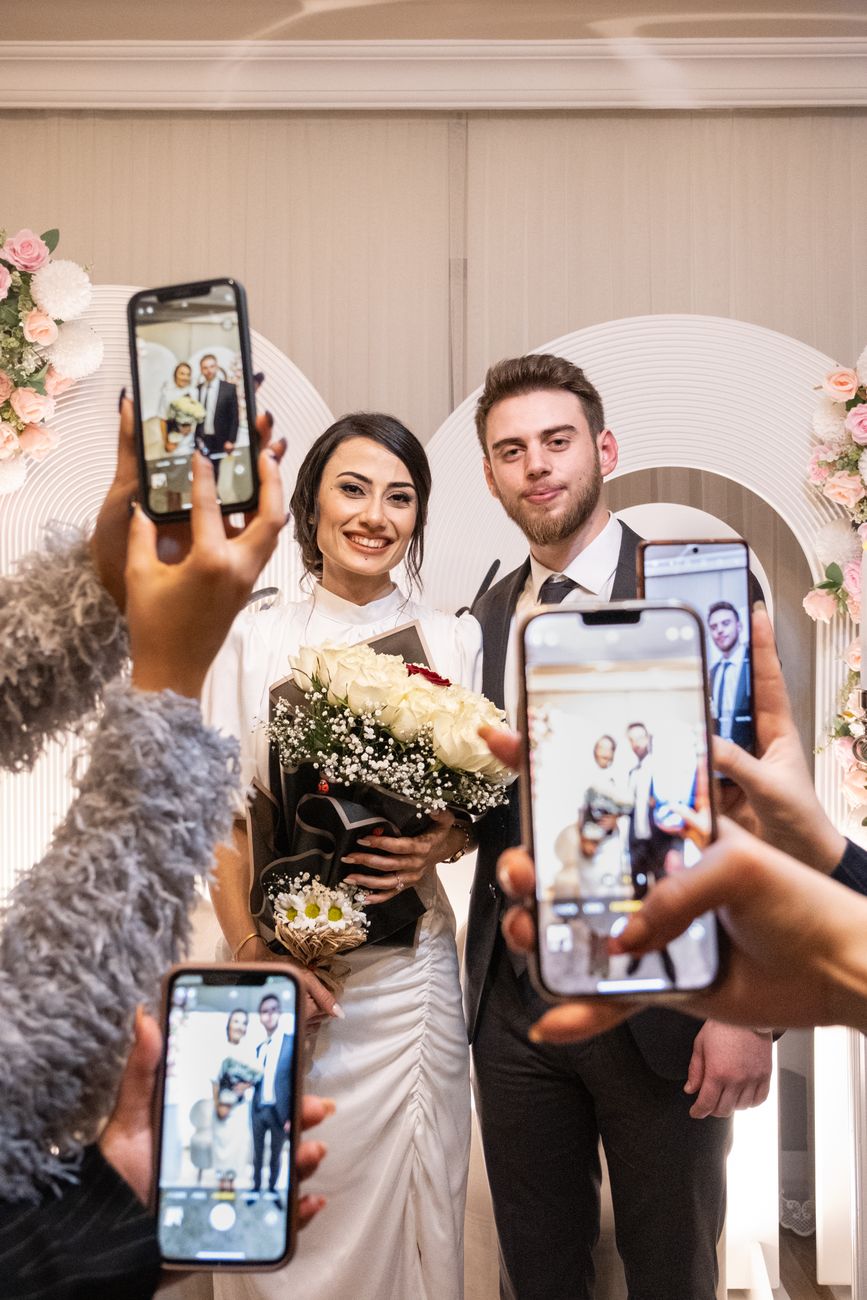 Photo by Amine İspir on Pexels.
What a Photo Booth Actually Costs in 2026
Before comparing alternatives, it helps to know the number you are comparing against. Rental pricing is remarkably consistent across US markets, and it breaks down by booth type more than by city.
| Booth type | Typical 2026 range | Usual package |
|---|---|---|
| Open-air booth (basic) | $400 to $950 | 2 to 3 hours, backdrop, 50 to 100 prints |
| Open-air booth (full wedding package) | $700 to $1,500 | 3 to 4 hours, attendant, unlimited prints, online gallery |
| Enclosed / classic booth | $700 to $1,400 | 3 hours, curtain, prints |
| Mirror booth | $800 to $1,500 | 3 hours, touchscreen, animations |
| 360 platform | $1,000 to $2,500 | 2 to 3 hours, platform, attendant, video files |
| Selfie station (unattended) | $300 to $700 | 3 to 4 hours, no attendant |
Hourly rates land around $100 to $200 for standard booths, climbing past $300 for premium formats, and nearly every vendor enforces a two-hour minimum. Add-ons stack fast: custom print templates, a second backdrop, an idle-hour fee if the booth has to sit through dinner, and travel outside the metro.
Two numbers matter more than the headline price. The first is capture window: you are paying for three or four hours out of a ten-hour day. The second is coverage: even during those hours, a booth only records the guests willing to leave the dance floor and stand in a queue. Every alternative below is really a bet about improving one of those two numbers.
Why Couples Are Moving Away From Traditional Photo Booths
 Photo by Ollie Craig on Pexels.
Three complaints come up again and again in wedding forums, and they are all structural rather than cosmetic.
The footprint. A booth plus a backdrop plus a props table plus a queue is roughly a 10 by 10 foot bite out of your floor plan. In a barn or a ballroom that is fine. In a restaurant buyout, a rooftop, or a 90-person venue, that is the space where people would otherwise be dancing.
The idle hours. Booths are busy for about 45 minutes, usually right after dinner, and quiet the rest of the night. You pay by the hour regardless. Couples who track it afterwards are often surprised how few unique guests actually used it.
The silo problem. This is the big one. The booth gives you a folder of booth photos. Your photographer gives you a gallery. Aunt Susan has 60 photos on her phone that nobody will ever ask her for, your college friends have a group chat full of them, and the best photo of the night is on a phone you will never see. You end up with three or four disconnected piles instead of one wedding album. Solving that is worth more than any single format on this list.
The 15 Best Photo Booth Alternatives
1. A Digital Photo Booth (QR Code, No Download)
 Photo by Julio Lopez on Pexels.
The most direct replacement, and the one that fixes coverage rather than just cost. You create an event, print a QR code onto table cards and a welcome sign, and guests scan it. A camera opens in their phone browser, they shoot, and every photo lands in one album you own.
The reason this beats a booth on coverage is that there is no booth. There is no queue, no capture window, and no corner of the room. It covers the getting-ready chaos, the ceremony exit, the toast nobody planned, and the 1am kitchen raid, because the cameras are already in every pocket.
What it costs: a one-time event fee rather than an hourly rate. PartyCam is free for up to 10 guests and $14.99 for 50 or $34.99 for 100, which is roughly a tenth of a booth rental.
The catch: the experience quality varies enormously between tools. Anything that makes guests download an app or create an account will lose a big share of them at the door. Check for browser-based capture, full-resolution downloads, no watermarks, and no gallery expiry date before you commit. We compared the main options in the QR code wedding photo app roundup.
2. A Digital Disposable Camera Roll
The disposable-camera aesthetic without the film lab. Each guest gets a limited number of shots, the photos are hidden until you reveal them, and the look is applied as they shoot rather than as a filter afterwards.
The shot limit is not a gimmick. It is the entire behavioural trick: 20 shots makes people think before they press the button, which is why disposable rolls historically produced better party photos than an unlimited camera roll. The delayed reveal turns the morning after into an event of its own.
What it costs: the same as any digital booth, so $0 to $35 for most events.
The catch: you give up the physical object. If half the appeal for you is handing someone a plastic camera, put three real ones on the head table and run the disposable camera app for everything else. We ran the full cost comparison in disposable camera app vs real disposables.
3. An Audio Guestbook
 Photo by Yeşim Çolak on Pexels.
A converted rotary phone sits on a table. Guests pick it up, hear a prompt, and leave a voicemail. You get a folder of audio files: your grandfather singing badly, your best friend crying two glasses in, a four-year-old explaining marriage.
It is the one alternative on this list that captures something photos structurally cannot, which is why it has spread so fast despite doing nothing visual at all.
What it costs: $150 to $400 to rent for the weekend, or around $200 to buy a refurbished handset outright and keep it.
The catch: it does not replace a photo booth so much as sit beside one, and it needs a quiet corner. Next to the DJ speakers you will record 80 files of bass. Also test the prompt: a vague "leave a message" gets awkward silence, while a specific question ("tell them one thing you know about love") gets gold.
4. Instax and Polaroid Stations
 Photo by Rachel Claire on Pexels.
Two or three instant cameras, a basket of pens, and a guest book with photo corners. Guests shoot, wait for the print to develop, stick it in the book and write underneath it. The finished object is genuinely lovely and it doubles as your guest book, which removes a line item.
What it costs: $80 to $150 per Instax camera, plus film at roughly $0.80 to $1.20 per shot. A hundred prints is $80 to $120 in film alone. Budget $300 to $450 all in for a 100-guest wedding.
The catch: the per-shot cost is the highest on this list, and it enforces its own scarcity. You will get 60 to 120 photos, not 600. Two other failure modes: guests waste film on test shots, and someone has to police the batteries. Assign it to a bridesmaid.
5. A DIY Backdrop, a Tripod, and a Phone
The classic build. A backdrop (fabric, flowers, a balloon arch, a painted board), a phone on a tripod at chest height, a remote shutter or a self-timer, and a ring light so the photos are not orange.
Done well this is genuinely indistinguishable from a rented open-air booth in the final photos, because a rented open-air booth is a camera on a stand pointed at a backdrop.
What it costs: $60 to $250 depending on how ambitious the backdrop is. A tension rod and eucalyptus garland lands at the bottom of that range, a floral wall at the top.
The catch: somebody owns this. Somebody sets it up, somebody keeps the phone charged, and somebody gets the photos off it at the end. The photos-off-it step is where DIY setups usually die. Point the phone at a QR-code album instead of its own camera roll and that problem disappears.
6. An iPad Photo Booth You Run Yourself
The commercial-grade DIY option. An iPad in a floor stand, a ring light around it, and photo booth software running in kiosk mode: countdown, four-shot strip, custom overlay, email or text delivery, and an optional dye-sub printer.
This is exactly what most rental companies are actually wheeling in. You are cutting out the attendant and the markup.
What it costs: $40 to $120 for the software licence for the weekend, $80 to $200 to rent the stand and light, plus the iPad you already have. A printer adds $200 to $400 to rent and roughly $0.30 per print in media. Call it $150 without prints, $500 with.
The catch: it is still a fixed station with all a booth's coverage limits, and it introduces a technical failure mode at 10pm with nobody on staff to fix it. Do a full dry run at home, disable auto-updates and notifications, and put it on mains power.
7. A Roaming Content Creator
 Photo by Kampus Production on Pexels.
Not a second photographer. A person shooting vertical video and candid stills on a phone all day, editing on the fly, and handing you a finished set of clips before the brunch the next morning. The output is deliberately phone-shaped: unpolished, fast, and the thing you will actually rewatch.
What it costs: $600 to $1,800 for a full day in most US markets, which puts it in the same bracket as a mid-range booth rather than below it.
The catch: it is a real hire with real coordination costs, and quality varies wildly because the role is new and unregulated. Ask for a full delivered set from a comparable wedding, not a highlight reel, and confirm in writing who owns the footage.
8. A Video Confessional Booth
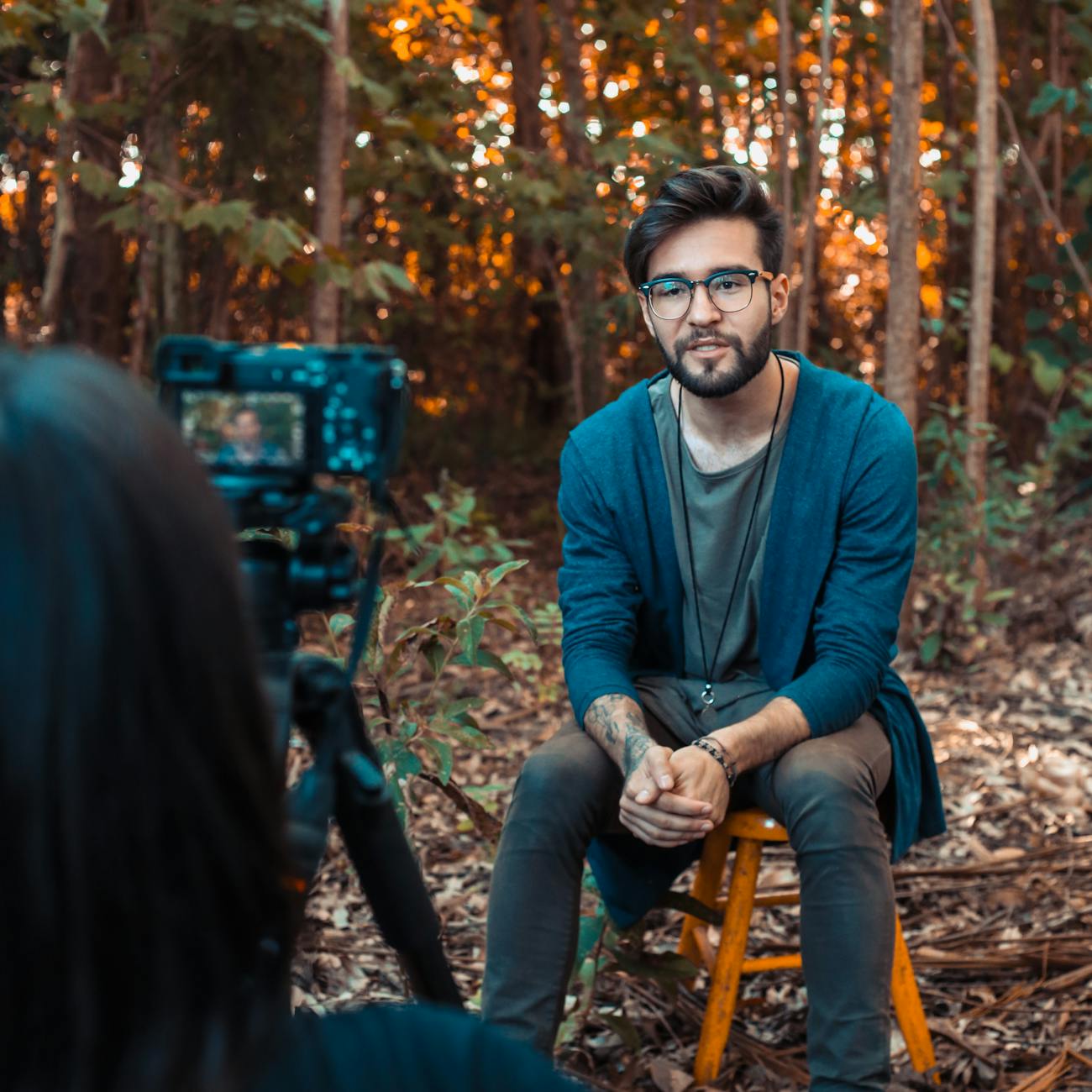 Photo by Rô Acunha on Pexels.
A chair, a camera, decent light, and a prompt card. Guests sit down and record 30 to 60 seconds of advice, a story, or a prediction. It is the audio guestbook with faces, and it produces the single most rewatched wedding video most couples end up with.
What it costs: effectively free if you build it around a phone and a tripod, or $300 to $700 if a videographer runs it as an add-on.
The catch: an unattended confessional produces long silences and inside jokes with no setup. It needs either a person nudging guests in, or a hard time limit that forces people to get to the point. If you are doing this on phones, note that most browser-based photo tools are photos only, so check whether video needs the host app. On PartyCam, for example, guests record one-minute clips in the free app rather than in the browser camera.
9. A Selfie Station or Selfie Throne
 Photo by RDNE Stock project on Pexels.
The stripped-back rental: a camera and ring light on a stand, a tap-to-shoot screen, no attendant, no printer, digital delivery only. Vendors price these as the entry tier precisely because there is no staffing cost.
What it costs: $300 to $700 for three to four hours, which is genuinely the cheapest way to have someone else's hardware in the room.
The catch: you are paying a few hundred dollars for a stand and a screen, and the delivery is usually a link to the vendor's gallery, which may expire. If the answer is "digital photos only", a QR-code album gives you the same output for less with no expiry. Ask specifically how long the vendor keeps the gallery live.
10. A 360 Video Platform
 Photo by Elias Jara on Pexels.
Guests stand on a low platform while an arm sweeps a camera around them, producing a slow-motion orbit clip built for Instagram. It is the most-searched booth format of the moment and it does draw a crowd.
What it costs: $1,000 to $2,500 for two to three hours. This is the most expensive option on the list, not an alternative to the expense of a booth.
The catch: three real ones. It has the worst throughput of any format, because it serves one group at a time and each clip takes a minute or two, so a queue forms fast. It needs meaningful floor space and overhead clearance, plus safety matting. And the clips are near-identical to each other by design, so the tenth is much less interesting than the first. Include it because you want the format, not to save money.
11. A Mirror Booth
A full-length mirror that turns into an animated touchscreen: signature capture, on-screen prompts, and prints. It photographs well as a piece of decor, which is a real part of the appeal.
What it costs: $800 to $1,500 for three hours.
The catch: it is a traditional booth with a nicer shell, so it inherits every limitation of one: fixed position, capture window, queue. If the mirror aesthetic is what you want, this delivers. If you were hoping for better coverage, it does not change that at all.
12. Live Illustration or a Caricature Artist
 Photo by Tranmautritam on Pexels.
An artist sketches guests, couples, or the room itself over the course of the evening. Guests take the drawing home, or the artist produces one large painting of the reception that you frame.
It is the strongest crowd-drawer here. People will stand and watch someone draw for twenty minutes, which is longer than anyone queues for anything else on this list.
What it costs: $400 to $900 for a caricaturist for three to four hours; $1,200 to $3,000 for a live painter delivering a finished canvas.
The catch: throughput is brutal. A caricaturist manages maybe 12 to 20 sketches in an evening, so at a 120-person wedding most guests get nothing. Frame it as entertainment, not as a way for everyone to go home with something.
13. A Green Screen Backdrop
 Photo by SHAHBAZ ZAMAN on Pexels.
Guests are composited onto a background of your choosing: the venue at golden hour, the city you met in, the surface of the moon, or a running joke only your friends will get. It is the cheapest way to make booth photos feel bespoke.
What it costs: $100 to $250 to add to a booth or DIY setup you are already building. A green muslin and two lights is under $120.
The catch: it is unusually lighting-dependent. Bad key lighting produces a green halo around everyone's hair, and a dim reception is exactly the wrong environment. It also skews novelty, so it dates faster than a plain backdrop.
14. A Props Table Without the Booth
Keep the part guests actually enjoy and throw away the hardware. A table of hats, signs, oversized glasses, and a chalkboard, positioned wherever people already congregate, with a QR code propped in the middle.
Props are the reason photo booths are fun. The booth is just the box the props came in. Untethered from the box, the props travel: they end up on the dance floor and in the photos your guests were taking anyway.
What it costs: $30 to $90, or free if you raid a costume box.
The catch: props migrate and do not come back. Buy cheap, do not use anything you want to keep, and accept that the moustache on a stick is going home in someone's pocket.
15. An Instant Print Bar
 Photo by Hakeem James Hausley on Pexels.
The hybrid that has quietly become the smartest setup on this list. Guests shoot digitally all night through a QR-code album, and a small portable printer at a side table prints anything they want a physical copy of. You get the complete gallery and the printed strips without paying for the booth in between.
What it costs: $80 to $150 for a portable photo printer, plus roughly $0.25 to $0.50 per print, on top of the digital album.
The catch: it needs one person to own the printer for the night, and portable printers are slow, so it works as a "print your favourite" station rather than a print-everything one. It is also the only option here that gives you both outputs, which is why it is worth the fiddle.
Comparison: Which Alternative Is Right for You?
| Alternative | Best for | Typical cost | Effort |
|---|---|---|---|
| Digital photo booth (QR) | Complete coverage of the whole event | $0 to $35 | Low |
| Digital disposable roll | The film look and a reveal moment | $0 to $35 | Low |
| Audio guestbook | Something photos cannot capture | $150 to $400 | Low |
| Instax / Polaroid station | A physical keepsake guest book | $300 to $450 | Medium |
| DIY backdrop and tripod | Tight budgets with a helper on hand | $60 to $250 | High |
| iPad photo booth | Booth output without the attendant | $150 to $500 | High |
| Roaming content creator | Same-week social content | $600 to $1,800 | Low |
| Video confessional | Speeches from people who will not speak | $0 to $700 | Medium |
| Selfie station | Hands-off rented hardware | $300 to $700 | Low |
| 360 platform | Spectacle and social clips | $1,000 to $2,500 | Low |
| Mirror booth | Booth photos plus decor | $800 to $1,500 | Low |
| Live illustration | Entertainment guests gather around | $400 to $3,000 | Low |
| Green screen | Personalised, funny backgrounds | $100 to $250 | Medium |
| Props table only | The fun part, minus the box | $30 to $90 | Low |
| Instant print bar | Full gallery plus physical prints | $80 to $150 plus prints | Medium |
If you want one recommendation rather than fifteen: run a digital photo booth as the backbone because it is the only option that covers the entire event, then add exactly one physical format on top for the tactile part. The most common winning combination is a QR-code album plus either an audio guestbook or an instant print bar.
How to Get Guests to Actually Use It
 Photo by Eric Lemon on Pexels.
This section matters more than which alternative you pick. A booth has a physical presence that advertises itself. Everything on this list except the rentals has to be actively communicated, and the couples who get 600 photos differ from the couples who get 40 by exactly these five things.
Put it where people already stop. One sign at the entrance gets scanned by people walking past it with a drink in each hand. Codes on every dinner table get scanned during the twenty minutes guests are sitting still with nothing to do between courses. Table cards outperform a single welcome sign by a wide margin. There are free printable table sign templates if you want to skip the design step.
Size the QR code properly. Use the 10:1 rule: printed width of at least one tenth of the scanning distance. A code scanned across a dinner table needs to be about 5cm wide; one on a welcome sign read from a metre away needs 10cm. Keep the white border around it, and test-scan the actual print, not the file. The free QR code generator exports at 1200px with the quiet zone already included.
Say what it is, not what to do. "Scan for photos" is ambiguous. "Scan to open the camera and add your photos to our album, no app needed" removes the two objections guests actually have, which are "do I have to install something" and "where do these go".
Seed it in the first hour. Send the link to your wedding party and immediate family the morning of. Twenty photos already in the album when the first guest opens it changes the behaviour completely, because nobody wants to be the first person to post.
Have one person announce it once. The DJ or the MC mentioning it once, right after dinner, is worth more than every sign combined. Once, though. Twice reads as nagging.
The Part Everyone Forgets: Getting the Photos Back
 Photo by www.kaboompics.com on Pexels.
Every option on this list produces images. Only some of them produce images you still have in five years.
A rented booth hands you a gallery link, and those links expire. Twelve months is a common retention window and some vendors charge to extend it. Instax prints exist in exactly one copy, so if the guest book gets damp there is no backup. Photos on your cousin's phone are gone the moment they run out of storage. The DIY tripod phone has 400 photos on it that somebody has to remember to offload.
Whichever alternatives you choose, decide up front where everything lands. In practice that means one shared album that you own, that accepts photos from any source, that exports at full resolution without watermarks, and that has no expiry date on it. Then the Instax prints, the confessional clips, the content creator's files, and the 300 phone photos from the dance floor all end up in the same place.
That is the argument for making a digital album the backbone rather than an add-on. It is the only element that can absorb the output of every other element. We wrote about the sorting-and-keeping side of this in what to do with wedding guest photos.
Frequently Asked Questions
What is the cheapest alternative to a photo booth?
A digital photo booth is the cheapest option that still produces a full gallery. Guests scan a QR code, a camera opens in their browser, and every shot lands in one shared album. There is no hardware to rent and no attendant to pay, so the cost is a one-time event fee rather than an hourly rate. A pure DIY setup - a backdrop, a phone, and a tripod you already own - is cheaper still, but someone has to collect the photos off that phone afterwards.
How much does a photo booth cost in 2026?
Typical US quotes for a standard open-air booth run $400 to $1,200 for a three to four hour package, and most couples land between $700 and $1,500 once an attendant, prints, and a backdrop are included. Hourly rates are usually $100 to $200 with a two-hour minimum. Mirror booths run roughly $800 to $1,500 and 360 platforms $1,000 to $2,500. Prices vary a lot by market, so treat these as ranges, not quotes.
Is a photo booth worth it at a wedding?
It depends on what you want out of it. A booth is worth it if you want printed strips in guests' hands the same night and you have the floor space and the budget. It is poor value if what you actually want is a complete gallery of your wedding, because a booth only captures the people who walk into it, and only while the attendant is on the clock. Many couples now do both: a cheap digital option covering the whole night, plus prints only if the printed strip is the part they love.
What is a digital photo booth?
A digital photo booth replaces the hardware with the phones guests are already holding. You create an event, print the QR code, and guests scan it to open a camera in their browser. Photos go straight into one shared album that you own. There is no booth, no queue, and no capture window, so it covers the getting-ready photos and the last song equally.
Can you make a photo booth with an iPad or iPhone?
Yes. An iPad in a stand running photo booth software is the classic DIY build, and it gives you the countdown, the four-shot strip, and an optional printer. Budget for the stand, a ring light, and the app licence, and remember it is still a fixed station someone has to watch. An iPhone on a tripod behind a backdrop does most of the same job for free if you skip the prints.
Do guests need to download an app to use a digital photo booth?
With the right setup, no. The best digital booths open the camera directly in the phone's browser after a QR scan, with no account and no install. Anything that pushes guests to an app store loses a large share of them at the door, which is the single most common reason a photo app produces a thin gallery.
Final Thoughts
The question is not really "what should I put where the photo booth would have gone". It is "how do I end up with the photos of my wedding". Those are different problems, and a booth only ever solved a slice of the second one.
Pick the backbone first: something that runs all day, costs almost nothing, and collects from everyone. Then add one physical format because you want the object, not because you feel obliged to fill a corner. A QR-code album and an audio guestbook is a better night than a $1,400 mirror booth, and it costs a quarter as much.
And whatever you choose, put the code on the tables. That one decision moves the needle more than the choice between any two options on this list.
Related reading:
- The Best QR Code Wedding Photo Apps Compared
- Disposable Camera App vs Real Disposable Cameras for Weddings
- How to Get Wedding Guests to Actually Take Photos
- Wedding Photo Table Sign Templates: Free Printable Signs
- What to Do With Wedding Guest Photos
About PartyCam: PartyCam is the QR-code event camera for weddings, parties, schools, and any gathering. Guests scan a code and shoot straight from their browser with no app, no account, and a real film look applied as they shoot. Videos are recorded in the free PartyCam app. Everything lands in one album you own, with full-resolution downloads, no watermarks, and no expiry date. Free for up to 10 guests. Create your event.